
Table of contents
- Don’t reinvent the wheel
- The Object-Action Framework
- Object-Action Event Examples
- Object-Action vs Other Event Naming Frameworks
- The Category:Object_Action Framework
- What to track?
- A note on autocapture (aka autotrack)
- Ensure Consistent Casing
- Create a tracking plan
- Key Takeaways
- About Growth Method
- Frequently asked questions
The object-action framework is an event naming convention that pairs an object (the thing a user interacts with, like a Button or Form) with an action (what they did to it, like Clicked or Submitted), written in past tense — for example Form Submitted or Button Clicked. It’s the naming standard recommended by Segment, Amplitude, Mixpanel, PostHog and mParticle, and fixes the single biggest cause of messy analytics: inconsistent event names.
Many marketing teams end up struggling to build effective dashboards and reports because their underlying event tracking is a mess.
Take, for example, the simple action of a user signing up for a newsletter. You could implement the event as Sign up, Signup, User Signed Up, sign_up, signed_up or signedUp, which can quickly become problematic.
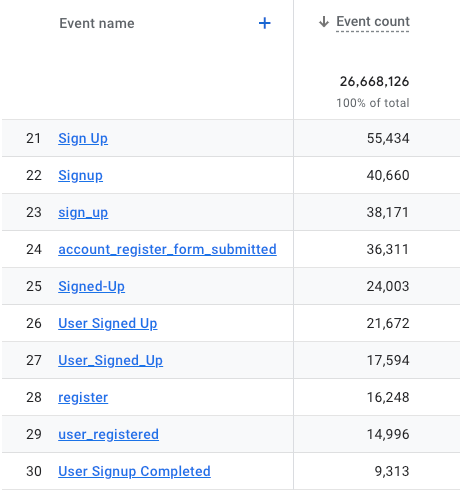
Most analytics tools are case sensitive, so even “Sign_up”, and “sign_up” will create two separate events.
Don’t reinvent the wheel
There are a number of proven and well documented event tracking frameworks used by some of the worlds largest companies that are designed to fix exactly this problem, so there’s no need to reinvent the wheel.
The most common event naming frameworks are:
-
The Object Action Framework
-
The Action Object Framework
-
The Noun Verb Framework
-
The Category Object Action Framework
If you only take away one thing from article it should be to* ***pick a single naming framework **(and stick with it). We strongly recommend teams choose the object-action framework.
The Object-Action Framework
The object-action framework has emerged as the general best practise and single most widely used approach to event tracking and naming. Below are some of the leading analytics companies that recommend it.
-
Segment: “At Segment, we implement analytics using the object-action framework.” Source
-
Amplitude: “Use a framework like Object Action as a best practice for governing the structure of your events” Source
-
MixPanel: “MixPanel Defines events with properties that can map to objects and actions” Source
-
PostHog: “For event names, use the category:object_action framework to make it easier to find a specific event within a long list:” Source
-
mParticle: “An object-action naming convention is clear and concise.” Source
The object-action framework states that every action performed by a user should be based on an ‘action’ operating on an ‘object’. For example: Form Submitted, Button Clicked, Page Viewed. In addition all actions should be documented in the past tense (i.e. Form Submitted and not Form Submit).
To clarify the Object-Action naming convention comprises of:
-
The Object - the thing on your website or app that customers interact with e.g. Button, Form, Page
-
The Action - actions customers have performed on those objects e.g. Clicked, Viewed, Submitted
Object-Action Event Examples
Below are examples of some common events based on the object-action framework.
-
Form: Started – Form Started
-
Form: Submitted – Form Submitted
-
Link: Clicked – Link Clicked
-
Button: Clicked – Button Clicked
-
Video: Started – Video Started
-
Video: Watched – Video Completed
-
Page: Visited – Page Visited
Object-Action vs Other Event Naming Frameworks
Object-action isn’t the only naming pattern out there. Here’s how it compares to the alternatives:
| Framework | Example | Best for |
|---|---|---|
| Object-Action | Form Submitted | Most teams — reads naturally as “what happened to what”, and is the pattern Segment, Amplitude, Mixpanel and mParticle recommend |
| Action-Object | Submitted Form | Less common; reads less naturally once written in past tense |
| Noun-Verb | Form Submit | A legacy pattern; inconsistent tense across events is a common source of data quality issues |
| Category:Object_Action | site:form_submitted | Larger implementations that need to group or filter events by where they originated (PostHog’s recommended variant) |
The Category:Object_Action Framework
For larger event tracking implementations many companies add category to the object_action framework in order to group related events and make them easier to find.
category:object_action
For example, categories could help make it easy to understand exactly where the event originated:
-
site:newsletter_subscribed -
app:account_created -
portal: user_passwordChanged -
api:check_complete
So app:account_created happened in the main app, affected the account, and tells me exactly what happened (new account created). You could also group related events by type e.g. Onboarding events, Navigation events, User interaction events etc.
What to track?
The general best practise here is to Keep it simple, Stupid as trying to track every possible action often results in data overload, which can hinder your ability to extract meaningful insights
Often, we see new customers try to track most—or even all—of the actions a user could possibly take in their product. Resist this urge. Though it feels logical to say that more data will lead to more insights, it usually doesn’t work out that way. Too much data actually obscures insights, burying them under an avalanche of events and properties you don’t really need to know about.
We suggest starting out by tracking two event types:
-
Signups, or conversions (those that enable you to understand growth)
-
“Value moments” or “Significant actions” a user takes, like clicking a button, completing a form, or watching a video
Typically growth marketers are most interested in events such as:
-
Demo booked
-
Button clicked
-
Call booked
-
Video played
-
Form submitted
-
File downloaded
One good way to approach a new event tracking implementation is to ask the 5 to 10 burning questions your team would like answers to, and to use these to define the most necessarily events and event properties to start with.
A note on autocapture (aka autotrack)
All modern analytics tools include autotrack or autocapture functionality which provides an out-of-the-box way to start capturing user interactions without requiring any custom configuration or code. For example GA4 has Automatically Collected Events and PostHog has Autocaptured events. Once autocapture is running, tools like the GA4 MCP server let you ask questions about that data in plain English instead of building a dashboard first.
Amplitude famously didn’t build auto-tracking functionality initially but finally introduced it into their platform in late 2024.
Autocapture is quick, accessible, and easy to use for non-engineers. Autocapture involves a one-time setup that captures user interactions and doesn’t require constant access to your app’s code or upfront coordination with an engineer. There’s a much lower learning curve and much less setup time required.
However, Autocapture does not completely eliminate the work needed to maintain your data. Instead, it shifts the work from the engineering team to the data team, which is responsible for sorting data, labeling events, and dealing with potential break-fixes caused by less stable tracking on your website or app.
For smaller teams, autotracking provides the ability to quickly get started with tracking without the need to manually create custom events for every button, link, form and conversion flow on their website. But, you absolutely still require an event tracking plan (see below for more information).
For most teams we recommend getting started with default events, particularly as platforms will often have pre-defined reports associated with default events. Then when it comes to custom events, use the object-action framework.
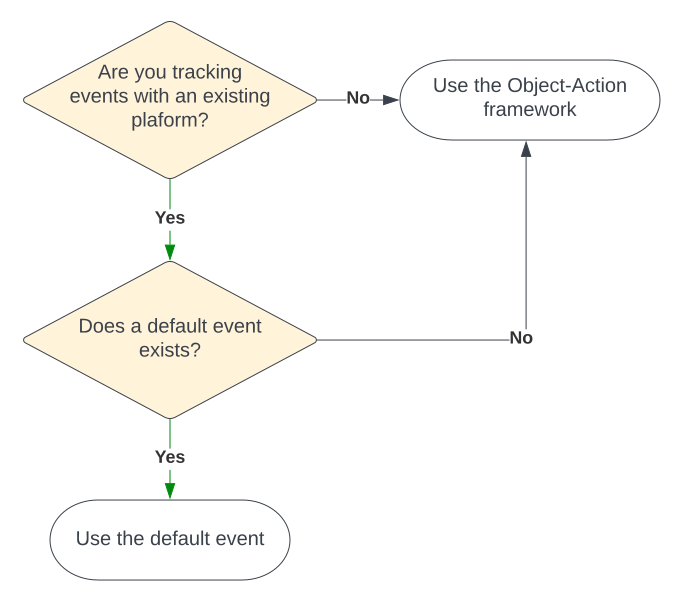
To get the most out of event tracking most marketing teams will always need to combine default events (like page views) with custom events.
Ensure Consistent Casing
A major culprit of data quality issues is inconsistent naming conventions. Inconsistencies build up gradually yet even the minor of inconsistencies can result in data quality and reports becoming confusing, unreliable and untrusted.
There are a number of casing options for event names, here are the most common:
-
All lowercase: All letters are lowercase. Example: button clicked
-
Snake Case: Words are lowercase and all words are separated by underscores. Example: button_clicked (or user_signed_up)
-
Title Case: Capitalise the first letter of each major word. Minor words (e.g., prepositions, articles) are usually lowercase unless they are the first or last word. Example: Button Clicked
-
Proper Case: Similar to Title Case but capitalises the first letter of every word, regardless of its part of speech. Example: Button Clicked
-
Camel Case: Capitalise the first letter of each word except the first, with no spaces. Example: buttonClicked
-
Sentence Case: Capitalise only the first letter of the first word, with proper nouns also capitalised. Example: Button clicked
Whilst there are no hard and fast rules for event and property name conventions, here are a few tips to keep in mind:
-
Avoid spaces in names as most platforms prefer delimiters (e.g. like underscores) instead of spaces.
-
Casing conventions often depend on the platform or analytics tool being used, so check for your individual use case.
-
Whilst preferences for event names tend to differ, almost all analytics platforms suggest snake_case or camelCase for property names.
-
Proper Case event names (e.g. Button Clicked) look nicer in dashboards and reports than snake_case (e.g. button_clicked)
Create a tracking plan
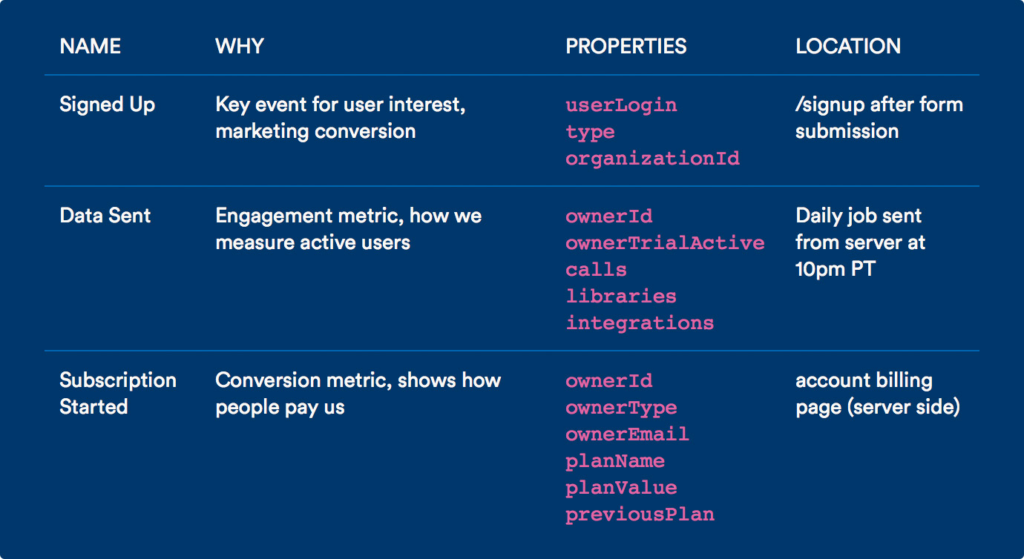
The most important step before you begin sending data to any analytics platform is to build a data tracking plan. This documents all the user behaviours you want to track, why they are important, and how they are defined. For a full walkthrough, see our guide on creating an event tracking plan.
A data tracking plan (usually referred to as just a tracking plan) is a document that acts as a source of truth for your event data—it’s a living document that contains all the information related to the data you gather about your customers.
Below is an example event tracking plan from Segment which shows what data is being tracked, where you’re tracking that data, and why.
Key Takeaways
It’s far better to invest time upfront in designing and document a system that works for your entire organisation than to rush an implementation and try to fix it later.
Small inconsistencies in event names can quickly add-up to cause major problems when it comes to building reports and many analytics platforms don’t let you rename events without losing historical data, making your initial choices effectively permanent.
About Growth Method
A clean object-action naming convention only pays off if the events underneath it actually get used to decide what to build or test next. Most teams do the naming exercise once, then let the resulting data sit in a dashboard nobody checks before planning the next campaign. That’s the gap Growth Method is built to close — it’s the agentic marketing platform for B2B teams, built for people and agents to plan strategy, ship campaigns, and learn what works, all in one place.
Connect the analytics platform you’ve just tidied up — PostHog, GA4, Amplitude and more are all supported — and Growth Method turns your well-named events straight into campaign baselines and results, so every test is measured against real before/after data instead of a hunch.
We are on-track to deliver a 43% increase in inbound leads this year. There is no doubt the adoption of Growth Method is the primary driver behind these results.
Laura Perrott, Colt Technology Services
Get started to see it running on your own data.
Frequently asked questions
What is the object-action framework?
The object-action framework is an event naming convention where every event name pairs an object (the thing a user interacts with, like a Button or Form) with an action (what they did to it, like Clicked or Submitted), written in past tense — for example, Form Submitted or Button Clicked.
How do you name events using the object-action framework?
Pick a single naming format and apply it consistently across your whole team — name the object first, then the action, written in past tense (Video Watched, Page Visited) — and document every event in a tracking plan so everyone uses the same names going forward.
What’s the difference between object-action and category:object_action?
Object-action names events like Button Clicked. Category:object_action adds a category prefix, for example site:newsletter_subscribed, so you can group and filter related events by where they happened — useful once you have a large number of events across multiple apps or products.
Which analytics platforms recommend the object-action framework?
Segment, Amplitude, Mixpanel, PostHog and mParticle all recommend object-action, or a category-prefixed variant of it, as their standard event naming convention.