
Table of contents
I’ve worked with Google Analytics - both Universal Analytics and GA4 - for years. Prior to running Growth Method I ran a digital agency (Digital Elite) and Google Analytics was our goto tool, as it was for most companies back then.
But, times have changed.
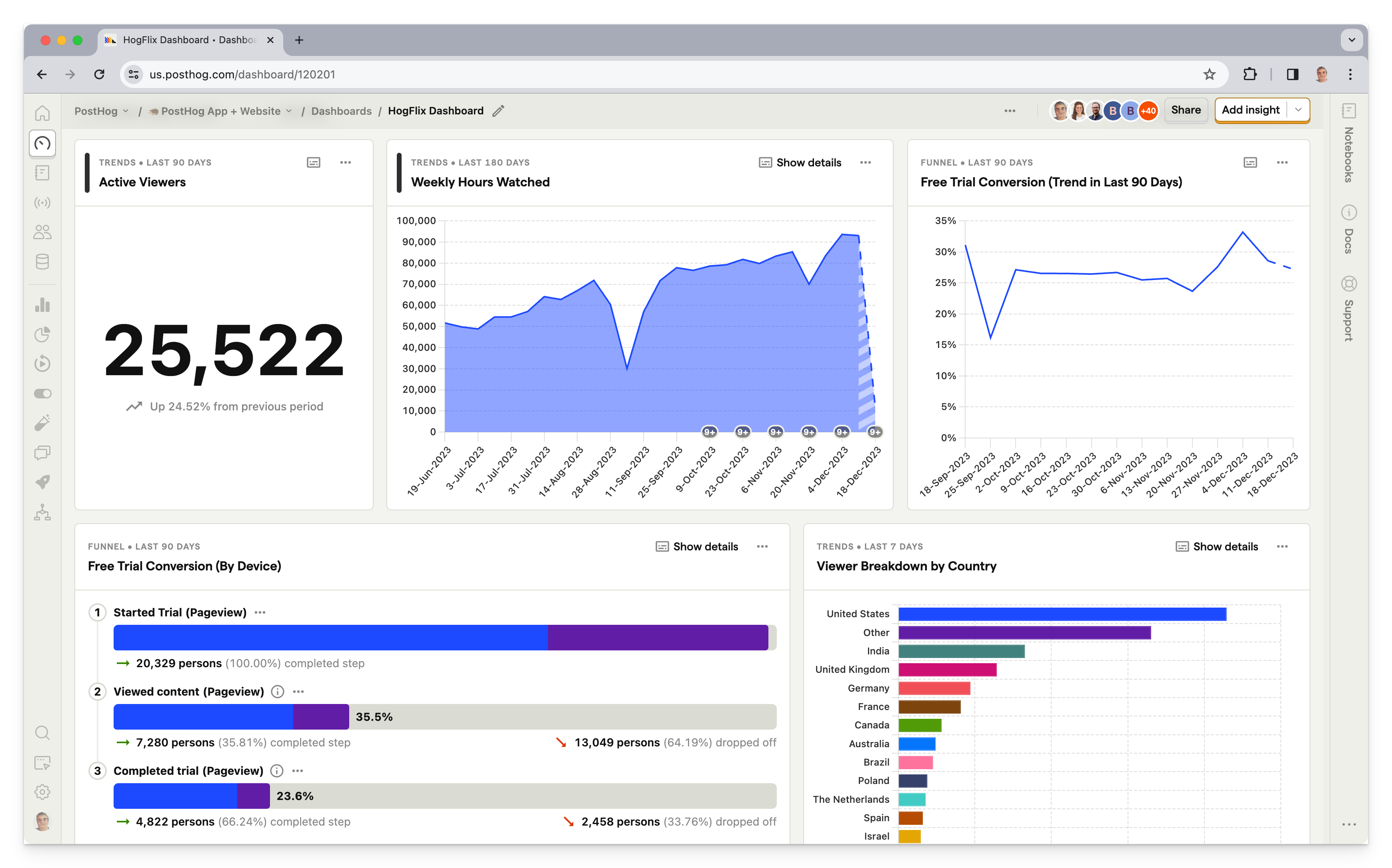
For the typical B2B company looking for a modern web analytics tool, PostHog is MILES ahead of GA4. Here are a few reasons why.
Quick verdict: if you’re a B2B marketing team choosing between PostHog and Google Analytics (GA4) in 2026, PostHog is the stronger default — it bundles autocapture, session replay, heatmaps, surveys, AI analytics and EU data hosting into one platform, where GA4 requires bolting on separate tools to match the same coverage.
Weighing other tools too? We’ve also compared PostHog vs Amplitude, PostHog vs Mixpanel and Amplitude vs Google Analytics.
| PostHog | Google Analytics (GA4) | |
|---|---|---|
| Autocapture | Built in | Requires manual event setup |
| Session replay | Included | Not available (needs Clarity/HotJar) |
| Heatmaps | Included (3 types) | Not available |
| Surveys | Included | Not available |
| A/B testing | Included | Discontinued (Google Optimize) |
| SQL access | Included (HogQL) | Requires BigQuery export |
| Data retention (free) | 1 year | 2–14 months |
| EU data hosting | Yes (Frankfurt) | US-based by default |
| AI analyst | Max AI included | Not available |
Autocapture
PostHog can capture frontend events automatically using autocapture. This captures events like
pageview,screen,click,change of input, or submission associated with abutton,form,input,select, ortextarea.
Yes there are still ongoing debates as to whether autocapture (aka autotrack) is bad, sure it can create a lot of noise early on, and creating custom events is a cleaner way of doing things. BUT, most b2b marketing teams do not have the time to manually create custom events for every button, link, form and conversion flow on their website. For these teams, autocapture is an absolute god send and will make you wonder why on earth you’re still using GA4 and Google Tag Manager.
TLDR; start with autocapture and go from there. Want to track across your website and app? That’s nicely handled for you too:
PostHog automatically sets a cross-domain cookie, so if your website is
yourapp.comand your app is onapp.yourapp.comusers will be followed when they go from one to the other.
Top tip: if a session has an autocapture event it’s treated as not a bounce
Heatmaps
Sure there are 4 million other tools that can provide heatmapping functionality, and it’s not unique functionality. But tools like HotJar have massively ramped up their pricing in recently years. Yes you can run heatmaps selectively based on your Google Tag Manager rules to reduce costs, but that’s another piece of complexity you don’t need that inevitably slows down the team and means you end up missing that one heatmap you really needed for analysis.
With PostHog, 3 kinds of heatmaps are included out of the box
-
Heatmap: which captures mouse movements, clicks, and rageclicks and shows you a heatmap of these interactions.
-
Scrollmap: which shows you how far users are scrolling down your page.
-
Clickmap: AKA the OG heatmap. It uses autocapture to show you the elements users are clicking on your website.
For more information see https://posthog.com/docs/toolbar/heatmaps
Web vitals capture
Everyone knows site speed and web vitals metrics are one of the most important rankings factors when it comes to SEO. Most B2B teams either a) check this stuff in Google Search Console or b) run a Page Speed Insights report, at some pretty random interval, usually not less than about once a quarter.
With PostHog, you can enable Google Chrome’s web vitals collection as part of the platform. So, your web vitals events can be integrated into your daily/weekly/monthly reporting, and can be used to enhance other parts of PostHog like web analytics and session replay.
Nice.
Session replay
Similar to Heatmaps, HotJar used to be the tool of choice when it came to session replay. In recent years the marketing community seem to have shifted from HotJar to Microsoft Clarity, largely because the cost is extremely attractive (i.e. free).
PostHog includes session replay as part of the core platform enabling you to record users navigating through your website or mobile app and play back the individual sessions to watch how real users use your product.
You can also:
-
Set session recordings for only specific URLs, based on a regular expression (storing session recordings of people viewing press releases probably isn’t that useful)
-
Set PostHog to only record sessions over X seconds in length (we tend to set this to 2 seconds)
This both avoids filling up your dashboard with useless recordings AND keeps you under the session recording billing limits.
More info at https://posthog.com/docs/session-replay/installation
Surveys
As a growth marketer I’ve always been gobsmacked at the cost of basic survey tools. Once again, HotJar has traditionally been a strong player here along with tools such as Survicate, Qualaroo, CrazyEgg and Pendo. As with so many of the features and functionality mentioned here though, why add more complexity to your already bulging marketing tech stack?
Survey functionality is include out-of-the-box with PostHog. Surveys are a great tool to collect qualitative feedback from your users.
More info at https://posthog.com/docs/surveys .
AB Testing
Ah, RIP Google Optimise. Sure there are loads of alternatives with VWO and Convert being two of the most popular among our clients. But, they are a) complex to setup b) complex to use well and c) often incredibly expensive. VWO and Convert have gained significant traction largely as a result of being two of the more accessible options when it comes to price.
But, PostHog includes AB testing as part of the platform, so you can now test the impact of product and website changes and understand how they affect your users’ behaviour. The one BIG caveat to this is that at the time of writing the AB testing functionality does not have a visual (wysiwyg) editor, but this is currently being worked on … super exciting.
More at https://posthog.com/docs/experiments/installation and https://posthog.com/ab-testing.
GeoIP enrichment
Hello GDPR! This isn’t the place for a privacy debate, but suffice it to say that if you want GeoIP enrichment of your website visitors, PostHog provides it out of the box.
The (optional) Geo-IP functionality enriches PostHog events and persons with IP location data. Simply enable this transformation and from that point on, your new events will have GeoIP data added, allowing you to locate users and run queries based on geographic data.
For more information see https://posthog.com/docs/cdp/transformations
Person profiles
Similar to the GeoIP enrichment functionality, we’re not going to get into a privacy debate here, but PostHog includes the ability to (easily) identify users and visitors out of the box should you need it.
So, you can store data about people, track users across multiple visits and devices, and create cohorts and visualizations based on person profile properties.
For more information see https://posthog.com/docs/product-analytics/identify
Pricing
All of PostHog’s current pricing information can be found here https://posthog.com/pricing. They have an extremely generous totally free tier and then usage-based pricing across the board for all the products, meaning you don’t have to signup for a $100/month survey tool to receive 5 survey responses.
Sometimes, they even decide to make less money.
Data retention
Data retention on the totally free tier, with no credit card added is 1 year. Once you add a credit card, data retention jumps to a whopping 7 years. Compare this to GA where the default setting for data retention is typically set at 2 to 14 months.
SQL Access
PostHog includes SQL access for building more advanced queries - they call it HogQL but it’s basically the same thing (we’ve written more about this over here). This means you you can directly query your data with standard SQL commands like SELECT, FROM, JOIN, WHERE and GROUP BY.
Granted most marketers won’t need this on day 1, and probably not in month 1, but when the inevitable happens that you need to create a custom dashboard, report or insight to surface some data that isn’t available ‘out of the box’ … the kind of thing that was previously completely impossible in Google Analytics (and incredibly painful in Data Studio too) … it suddenly becomes much easier.
Given it’s standard SQL, if you’re not a developer, you can likely use ChatGPT to generate your query for you too 🎉
GDPR compliance
One of the things the European Commission really doesn’t like is companies transferring EU users’ personal data outside of the EU. In fact, European countries like Austria, Denmark, France, Italy, and The Netherlands have recently deemed Google Analytics to be illegal (in its default configuration) because of personally-identifiable data being transmitted to the United States.
Unlike with GA4, with PostHog Cloud you can choose where you want your managed version of PostHog to be run from - either PostHog Cloud EU (hosted on servers based in Frankfurt) or PostHog Cloud US (hosted on servers based in Virginia).
For more information see https://posthog.com/docs/privacy/gdpr-compliance
Flexible alerting
PostHog alerts enable you to monitor core metrics (aka Insights) like Traffic or Conversions and generate alerts when certain conditions are met. For example, when organic traffic or conversions drop below X amount, send an email alert.
Note: alerts are evaluated on a schedule (hourly, daily etc) not in realtime. At the time of writing this functionality is in Alpha testing.
Max AI
PostHog has shipped Max AI, an AI-powered product analyst that lives inside your PostHog project. Ask questions in plain English and Max will write SQL queries, search session replays, create surveys, set up feature flags and experiments — handle the grunt work that normally takes 20 minutes of clicking around.
Max can now search the web to learn about your product and business. The /init feature uses multi-step web search to build project-level memory, meaning Max gets smarter about your specific business over time. It’s not starting from zero every time you ask a question.
Good luck getting anything like this from GA4. Instead of learning how to navigate a clunky interface, PostHog learns how you think about your data and meets you where you are.
For more information see the PostHog AI docs.
Shipping speed
Browse the PostHog changelog and one thing jumps out: this team ships at a pace that makes most SaaS companies look stationary.
PostHog operates as a collection of small teams — up to 6 people each — that own their products end-to-end. No design gatekeeping, minimal meetings (Tuesdays and Thursdays are meeting-free), and a culture that values speed over polish. As PostHog cofounder James Hawkins puts it:
We deliberately designed our company for speed. You can too.
When you pick an analytics tool, you’re picking a team. PostHog’s team ships features, fixes, and improvements at a rate that means the product you use today will be noticeably better next month. Try saying that about GA4.
Integrations
PostHog can be integrated with external apps in a number of different ways including:
-
Sources - data sources enable you to sync external data into PostHog so that PostHog can act like your Customer Data Platform (CDP). At the time of writing supported sources include Stripe, Hubspot, Zendesk, Salesforce and more.
-
Destinations - enable you to send your data in realtime or in batches to destinations outside of PostHog, such as Slack, Airtable, Google Ads, HubSpot, Salesforce, Zapier and many more. See https://posthog.com/docs/cdp/destinations for further information.
-
Transformations - you can transform data within PostHog using a number of prebuilt pipeline transformations. For example, GeoIP enrichment enables ayou to enrich your data with additional geolocation information.
-
There are some official apps built on the PostHog API, including the Notification Bar app which can display in-app messages via a customisable banner
-
You’ll also find a number of 3rd parties that have PostHog integrations, such as Cal.com https://cal.com/blog/maximize-the-power-of-your-cal-com-account-with-posthog
Great support
There’s a really active community and forums at https://posthog.com/questions along with extensive documentation at https://posthog.com/docs. Also, if you reach out to PostHog directly you are connected with someone that really understands the product, and they actually reply, promptly. Try getting that from Google Analytics support.
If you’re looking for 3rd party support, there are also an increasing number of freelancers on platforms such as Upwork with PostHog skills and experience.
Simplicity
If at this point you’re thinking - I get all the above, but I can use my heatmaps in HotJar or Microsoft Clarity, I already use Convert/VWO for AB testing, I can use Page Speed Insights reports for my web vital stuff and can push all my data from GA4 to BigQuery for free or very low cost (you get 10GB of free storage, 1TB of queries free each month, and costs beyond that are minimal) and then I can use Looker Studio for reporting.
Sure, you can do all of that, but how difficult do you want your life to be?
Simplicity is the ultimate sophistication.
Leonardo da vinci
About Growth Method
Given HogQL is available via the PostHog API, this comparison is exactly the kind of first-party data thinking Growth Method is built around. Growth Method is the agentic marketing platform for B2B teams. It connects to your PostHog account (or via the PostHog MCP server for agent-driven workflows), so you can request analytics data using natural language (like “get me pageviews data for all /product/ pages”) and have it flow straight into your marketing campaigns. If you’ve already made the shift to first-party data, Growth Method is how you put it to work in your day-to-day marketing.
Get started to see how it fits your stack.
Frequently asked questions
Is PostHog better than Google Analytics?
For most B2B marketing teams, yes. PostHog includes autocapture, session replay, heatmaps, surveys and AI-powered analytics in one platform with a generous free tier, whereas GA4 requires stitching together separate tools like HotJar and Optimize for the same coverage.
Can you use PostHog and Google Analytics together?
Yes. Many teams run PostHog and GA4 side by side during migration, using GA4 for historical continuity while moving day-to-day product and marketing analysis to PostHog. There’s no technical conflict between running both simultaneously.
Does PostHog replace Google Analytics (GA4)?
PostHog covers everything most B2B marketing teams use GA4 for — pageviews, events, funnels, attribution — plus session replay, heatmaps, surveys and SQL access that GA4 doesn’t offer natively, so it can fully replace GA4 for most use cases.